

iThemeland Reviews WooCommerce Product Table Tools Used in High-Volume Catalog Stores
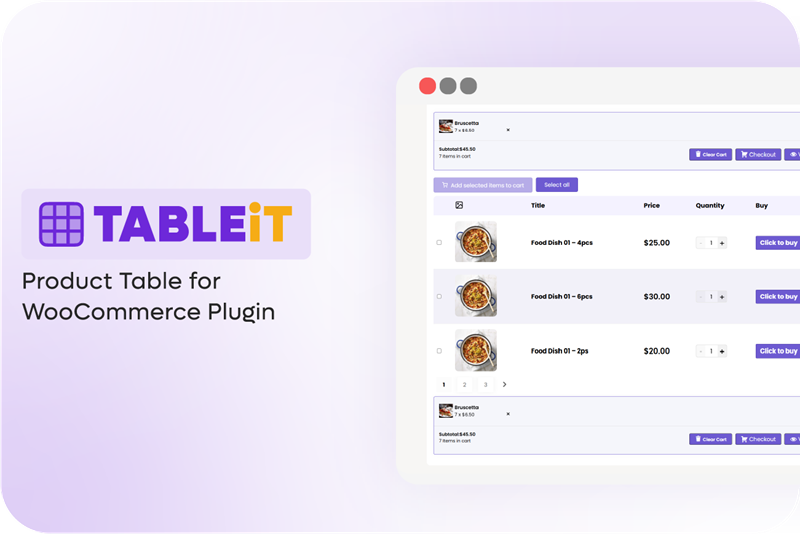
WooCommerce product table
As WooCommerce catalogs grow, product tables replace grids to improve speed, comparison, and bulk ordering, with common plugins enabling scalable UX
CA, UNITED STATES, December 21, 2025 /EINPresswire.com/ -- As WooCommerce stores expand their catalogs, traditional grid-based product layouts are increasingly unable to meet user expectations for speed, visibility, and efficient decision-making. Studies from Baymard Institute suggest that clearer, more structured product listings can significantly improve conversion performance.
Moreover, Recent observations across multiple storefronts show that the need for streamlined browsing experiences on mobile phones has collectively driven a noticeable shift toward structured, table-based product displays.
That is why presenting products in a clear, sortable, and actionable format using Product Table Plugins is no longer a luxury—it is increasingly viewed as a functional requirement for stores competing in high-SKU environments.
Key Pain Points in Traditional WooCommerce Product Browsing
Observations across multiple WooCommerce stores—particularly those managing large catalogs—revealed several recurring challenges:
- No option for bulk or multi-item add to cart in the shop page.
- No filtering or sorting options specifically for attributes, prices, or categories.
- Lack of comparison of similar products in a grid layout.
- Time-consuming process of ordering products for B2B, wholesale, industrial, and parts-based stores.
These recurring issues indicate that many stores require a more structured, high-visibility format that helps users process information quickly.
Market Trend: Moving From Grid to Table Layouts
The response of many WooCommerce stores to these pain points has been to replace grid-style catalog pages with table-oriented layouts. They recognized that displaying products in a table view supports faster decision-making and shortens the purchase journey, particularly in:
- wholesale environments
- restaurant and food-supply catalogs
- automotive and parts stores
- multi-SKU technical inventories
On the other hand, the table view of the shopping page made the customer purchase journey more enjoyable by providing fast ordering, bulk add-to-cart, compact data visibility, and search-optimized browsing options.
Market Solutions for Table-Based Product Presentation
Across the observed implementations, several approaches have been used to support table-formatted products.
To enhance product discovery and streamline the shopping experience, market solutions use the following features to reduce customer effort and accelerate the decision-making process:
Customizable & Structured Product Tables
The product table tools provide drag & drop customization to help users display key information like SKU, stock status, and attributes in different columns of a table.
The table view meets the requirements of B2B buyers or detail-oriented shoppers to compare specifications at a glance, reducing the need to click into individual product pages.
AJAX-powered Filtering & Search
Instantaneous filtering and searching without page reload addresses one of the most challenging of customers. Research in web usability consistently shows that real-time filtering and search features can significantly improve customer satisfaction. It allows customers to iteratively refine large catalogs in real-time, preventing frustration and basket abandonment.
Inline Add-to-Cart Controls
Placing the "Add to Cart" button directly within the table row enables one-click actions. It can reduce the steps to purchase, and help customers to order products faster and making bulk ordering intuitive, which directly increases average order value.
Mobile-Optimized shop pages
The product table solutions allow users to create responsive tables that adapt to small screens with horizontal scroll or card-based views, respecting the mobile-first reality. It can make the browsing experience remain efficient for on-the-go users, who now represent the majority of online traffic.
Display of Custom Metadata
Showing metadata (like lead time, batch number, or custom fields) within the table builds trust and transparency. It answers potential buyer questions quickly, shortening the consideration phase and reducing pre-purchase inquiries to support.
Flexible Product Table Solutions for High-Volume Stores
According to store managers, three commonly used tools with a helpful approach to handling data, flexibility, and ordering workflows are:
- iThemeland TABLEiT - Advanced WooCommerce Product Table Plugin
iThemeland WooCommerce product table plugin is suggested by store owners looking for a high level of flexibility in table layout, column structure, and device-specific responsiveness. The TABLEiT plugin supports configurations where large catalogs must be displayed in a structured, scalable format while maintaining fast loading and easy navigation.
The plugin comes with practical features, including:
- Drag-and-drop control to display WooCommerce fields in the columns.
- Support custom fields (integrating with ACF, taxonomies, metadata).
- Allowing users to customize the layouts for desktop, tablet, and mobile.
- Add as many filters, search boxes, and sorting options as needed to the navigation bars.
- Support multi-item ordering inside the table.
Store managers reported adopting this type of solution primarily to improve ordering efficiency rather than visual presentation.
- Bulk Order Form for WooCommerce (WPExperts)
This plugin is commonly used in stores that require fast, form-based ordering for large product lists. The plugin replaces traditional grid layouts with a searchable order form that allows customers to view multiple products, enter quantities inline, and add items to the cart in bulk.
It is often adopted by wholesale, B2B, and catalog-driven stores where speed, SKU-based ordering, and simplified product discovery are prioritized over visual browsing experiences
- Extend B2B — Product Tables for WooCommerce
Extend B2B is popular among B2B stores that include multi-layered pricing structures, quotation workflows, and role-based catalog visibility.
Based on the research, product tables designed with this solution are often adopted in cases where:
Corporate accounts or repeat buyers often place orders.
Customers need to order bulk quantities and standard negotiated prices.
Different user roles are allowed to see different product catalogues.
Customers need to order and quote within the same interface.
Conclusion: Implications for WooCommerce UX and Conversion
Evaluating the reports collected from store owners, product tables are increasingly shaping how users navigate extensive catalogs and complete multi-item purchases. The features provided by Product table plugins, like allowing customers to compare information at one glance or filtering and searching options that make finding their preferred items easier, improve product discovery, and reduce friction during ordering.
Many online stores are increasingly incorporating product tables as part of their UX strategy for high-SKU and fast-ordering environments.
Sara Jey
iThemeland
+1 533-579-6064
email us here
Visit us on social media:
LinkedIn
Facebook
YouTube
Legal Disclaimer:
EIN Presswire provides this news content "as is" without warranty of any kind. We do not accept any responsibility or liability for the accuracy, content, images, videos, licenses, completeness, legality, or reliability of the information contained in this article. If you have any complaints or copyright issues related to this article, kindly contact the author above.
